
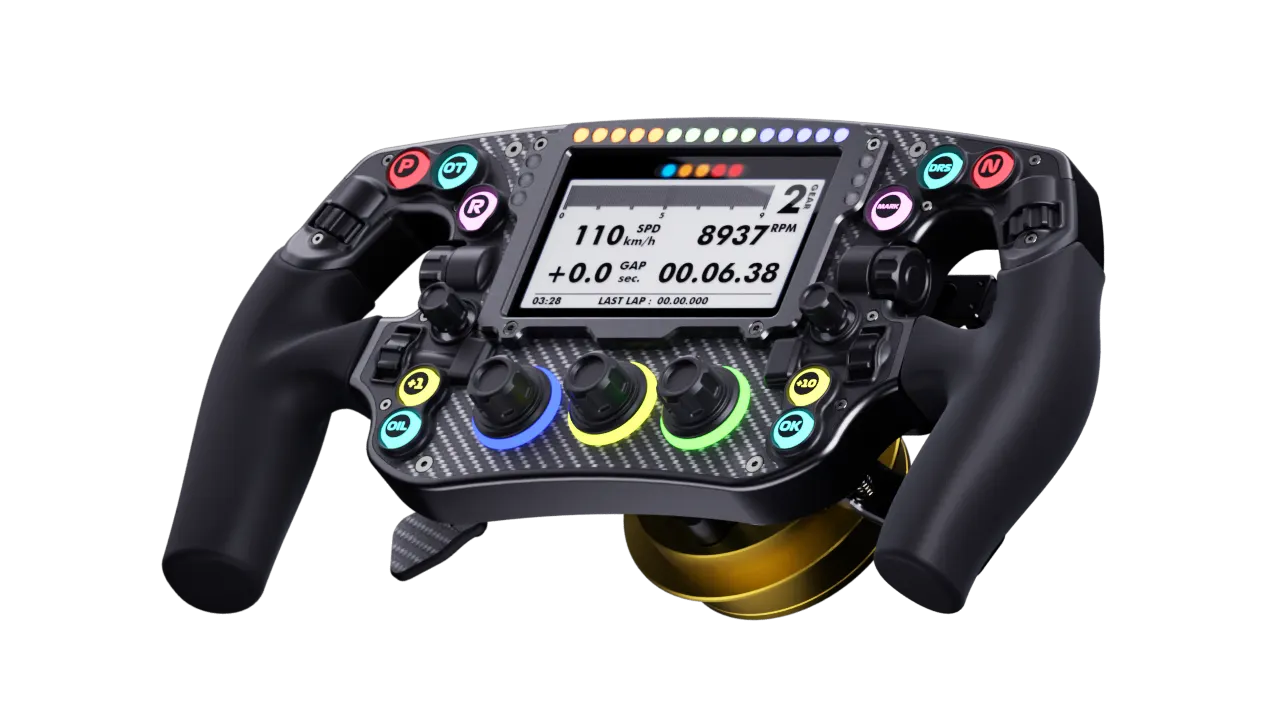
XF1 Ultimate
FEATURE 1. 295mm polyurethane grip, produced by high-precision molds, has a special coating on its surface, and its delicate texture satisfies various driving needs. 2. The back cover and paddles are processed using CNC technology and coated with black anodizing to achieve optimal appearance and lasting durability. 3. The front panel and paddles are made of 3K carbon fiber with high-end textured coating. 4. 4.3 inch IPS screen with a resolution of 800x480 pixels and 60fps refresh rate, and its dashboard can be customized through SimHub. 5. Aluminum alloy screen surround frame. 6. Low latency 2.4G wireless functionality(need to purchase Wireless Kit separately). 7. In Fanatec mode, it is compatible with PS4/5 (tested only on DD Pro and GT7 and F1 24 only, need to purchase Wireless Kit separately) 8. Supports wireless SimHub dashboards. 9. 21+10+3 RGB LEDs that can be customized through SimHub. 10. 10 RGB buttons, 2 Multi-directional joystick with integrated encoder and 3 push-button encoders, 6 thumb knob. 11. It comes with a standard magnetic silent shifter paddle, and additional clutch paddles and option paddles are available as options. 12. The clutch paddles can be set to bite point mode, axis mode. 13. All paddles use non-contact Hall sensors for long-lasting durability. 14. 70mm diameter QR mounting hole. 15. The Fanatec QR produced by Leoxz can be used to unlock the torque of the Fanatec base. 16. Fanatec mode for compatibility with PS4/5 on Fanatec bases. Supports access to the Fanatec Tuning Menu for adjusting base settings. 17. Equipped with a industrial-grade GX12 threaded USB interface and a USB double-twisted cable with nylon tensile resistance, subjected to 100,000 cycles of cable twisting tests. COMPATIBLE HARDWARE Simucube SC1, SC2 Fanatec DD1, DD2, CSL DD, DD Pro, DD+ (To unlock the base torque, you need to use the Fanatec QR produced and sold by Leoxz, as the official Fanatec QR is not compatible with third-party wheels) Simagic Alpha Mini, Alpha, Alpha ultimate Moza R12 (The V1 base does not support QR power supply. The V2 base supports QR functionality, but Leoxz has only tested it on R12, so the compatibility with other bases cannot be guaranteed. In this case, USB cable can be used for power supply) Asetek Direct Drive Wheelbas( Installation of the Invicta Quick Release Adapter is required for the steering wheel) If using Simagic, Moza, or Fanatec base, the steering wheel can be powered wirelessly through QR produced and sold by Leoxz. SOFTWARE SimHub and SimBridge SimHub for getting telemetry data SimBridge is used to receive SimHub data and send it send to XF1 PACKAGING Dimensions (LxWxH): 33cm x 19cm x 14cm Weight: 1.5kg(QR version 2.0kg) INCLUDED XF1 Ultimate Steering Wheel (QR and Wireless kit are optional) USB-GX12 Cable Custom Stickers Nylon Tweezers 6mm height paddle spacers/M3x14 bolts (You can choose whether to install it based on the size of your hand, x4 for Shifter Only and Shifter & Clutch versions, x8 for Shifter & Clutch & Option version) NOTES 1. The steering wheel can only be used in sim racing 2. For USB power input, the maximum voltage is 5V. For QR power input, the maximum voltage is 12V. Exceeding these maximum voltage limits may result in damage to the steering wheel. 3. Due to the large number of RGB LEDs on the steering wheel, its power consumption is very high. Please ensure that the steering wheel is directly connected to a USB port on the back of the PC via the GX12 cable to meet the power requirements. If you need to extend the USB connection, be sure to use a USB extension cable or USB hub with an external power supply. Another option is to reduce the brightness of the RGB lights or turn them off completely. 4. The free version of Simhub only outputs data at 10 frame rate, you need to purchase an additional license to have 60 frame rate. 5. When using the wireless functionality of the steering wheel, it is recommended to place the wireless receiver within approximately 0.5 meter or closer to the steering wheel, and there should be no obstruction between the wireless receiver and the steering wheel. Otherwise, it may result in a decrease in wireless speed. You can check the wireless quality through the steering wheel menu. Green indicates good wireless quality, orange indicates average wireless quality, which may cause steering wheel delay, and red indicates poor wireless quality with noticeable steering wheel delay. If your PC is more than 0.5 meter away from the steering wheel, please try using USB hub or USB extension cable to connect the wireless receiver, and place the USB hub or extension cable closer to the steering wheel. 6. The wireless function of the XF1 Ultimate operates on 2.4G frequency, so setting your environment’s WiFi to 5G frequency can effectively avoid interference with the XF1 Ultimate. If you can only use 2.4G WiFi, please ensure that the Wireless Kit is at least 3 meters or even further away from the WiFi antenna to reduce WiFi antenna interference with the steering wheel's wireless signal and try to set the 2.4G WiFi channel to 1-6 as much as possible. 7. For bases that may have noticeable EMI issues, such as the Fanatec DD1/2, the optimal choice is to connect the steering wheel using an externally powered USB hub, along with a USB isolator. Additionally, it is recommended to ensure that the DD1/2 has an additional grounding cable (https://fanatec.com/us-en/faq/details/id/72). 8. Fanatec compatibility has only been tested with driver and hardware versions prior to May 1st, 2024. 9. Polyurethane grip is coated with a sweat and dust-resistant layer. It is not recommended to use it with gloves to avoid wearing down the coating. Download XF1 Ultimate Manual SimBridge SimHub
Related products


